
Table of Contents
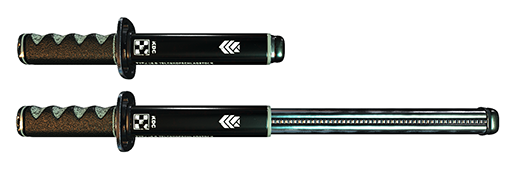
The KDC Type66-D “Compact Compliance Club” is a “two stage” expanding baton loosely based on the Type65, used by the Japanese police. It features a Katana-styled handle designed to match the style of the KDC HC-03W Elektro-Handschellen and KDC EIG-2-B Stunprod, it is loosely inspired by the universe & aesthetic featured in the video games Signalis and HENPRI.
Content
- KDC Compact Compliance Club - A (right hand)
- KDC Compact Compliance Club - A2 (right hand)
- KDC Compact Compliance Club - B (right hand)
- KDC Compact Compliance Club - C (right hand)
- KDC Compact Compliance Club - holster (pelvis)
- KDC Compact Compliance Club (hud)
Features
- Mouse look stance blending system.
- 3 light hit and 3 heavy hit animations with held poses.
- Swing, strike sounds & visual effect.
- Self hiding belt attachment.
- (optional) Auto-temp-attach function.
- (optional) 3rd person view Control HUD.
- (optional) Compatible with KDC Doodles & Strikes bruise engine.

PBR/GLTF Materials
The current version of the KDC Type66-D Compact Compliance Club support the new GLTF material system and is not provided with fallback textures. A PBR compatible viewer is strongly recommended.
Variant A? A2? B? C?
The KDC Type66-D Compact Compliance Club comes in 4 variants that use a different idle stance:
- A:Held casually against the shoulder.
- A2: Held at an angle over the shoulder & behind the neck.
- B: Held at the avatar side.
- C: Same as above but with a wider gap between the arm and the hips.
If you plan to use the auto-temp-attach function, keep in mind that the holster can only house one variant at a time. You can also delete the animation anim_hold from the baton inventory, if you'd rather have NO stance pose.
Controls
Deployment & Retraction
It is important to understand that while the baton is in it's collapsed/compact form, while it can be used to gesture around with the light hit function, it CANNOT perform an actual strike anyone unless it is fully deployed.
To deploy/expand the baton, simply perform a hard hit in the air.
Retracting the baton is done by clicking the body/handle (wearer-only).
Using mouse look
Stance
While in mouse look, using the left mouse button will trigger a hit of the “KDC Type66-D Compact Compliance Club”, you can affect whether the high, medium, or low animation is triggered by aiming at a different height on your victim, but it's important to understand that the selected stance depend on your own view angle and not where you are aiming specifically.
Strength
If you do a simple “click” you will by default trigger the “light” hit sequence, holding down the mouse for a brief time before releasing it will trigger a “hard” hit.
You can hold the mouse button pressed for as long as you want and your avatar will keep its arm raised, ready to strike. Changing your view angle will seamlessly change stance.
Note: If you have shadows enabled, you can observe the stance change by looking at your avatar's shadow.
Using the HUD
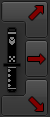 Wearing the HUD will allow you to control the Compact Compliance Club from 3rd person view. It will allow you to directly select the high/medium/low stance directly using the buttons with the red arrows on them.
Strength
Like in mouse look mode, whether you click, or click and hold the red arrow buttons will affect whether you land a “light” or a “hard” hit. As before, you can hold the button down for as long as you like.
Note: The baton range can vary from 1 to 5 meters based on the actual length of it, a longer baton will reach further.
Auto-attach setup
The Compact Compliance Club comes with an auto attach feature that allows you to click the holster or the baton symbol on the HUD to automatically attach/detach it from your hand without RLV and without inventory clutter.
The holster will also remember (and display) whether the baton is currently deployed or not.
- Wear the Compact Compliance Club at least once and then take it off.
- REZ the holster on the ground. (this is required because of how permissions work in SL)
- Right click/Edit the holster and drag/drop the hand version of the Compact Compliance Club inside its inventory.
- Pick up and wear the holster, it is now ready to use.
NOTE: Do not forget to replace the Compact Compliance Club inside the holster when you receive an update
Doodles & Strikes bruising
 When wearing a KDC Compact Compliance Club, a long click/release on any body part covered by the KDC Doodles & Strikes engine will deliver a baton strike instead of the normal slap, it will also mark the body with bruises instead of hand marks.